How ApplyOS keeps AI feedback tied to the right resume version
A practical look at saved resume versions, PostgreSQL constraints and API checks in ApplyOS, and why an AI result needs a clear record of what it evaluated.
An AI response can read well and still be attached to the wrong input.
Imagine uploading a resume, checking it against a job description, then saving an edited version. When you return to the feedback screen, which version does that feedback describe?
That question shaped how I built Job Fit in ApplyOS. The feature compares a saved resume with an application's job description. To make the feedback useful, I need to keep the result connected to the exact resume that went into the request.
This article walks through the current implementation in Next.js, TypeScript and Supabase PostgreSQL. The screenshots use demonstration records. Their scores are examples, not hiring predictions.
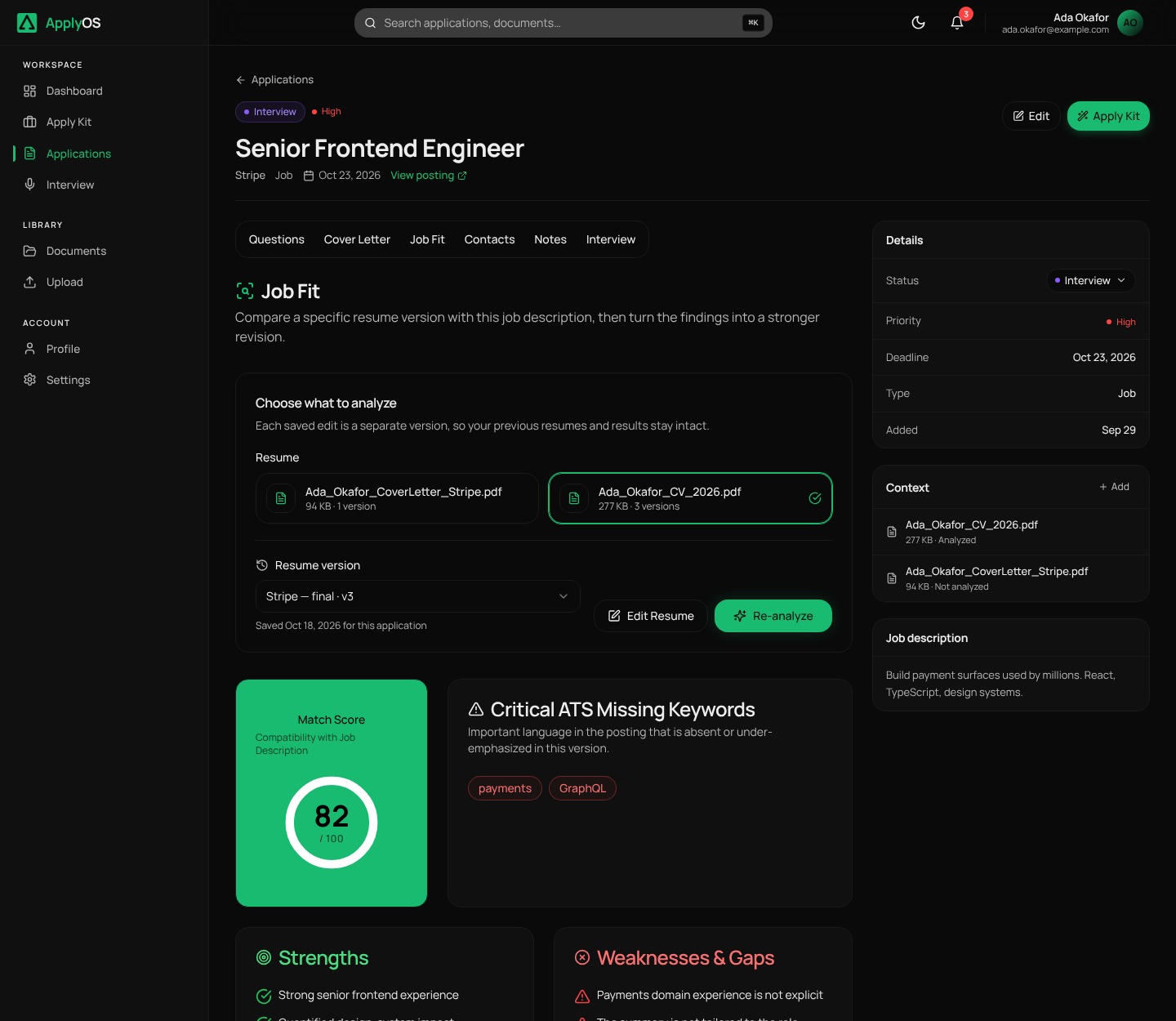
Start with three records
I separate the uploaded document, a saved resume version and the analysis result.
- The document holds the source upload and its extracted or parsed content.
- A resume version identifies a saved snapshot associated with that document.
- An analysis connects an application to the version it evaluated.
That gives the result a clear identity:
Application + saved resume version -> Job Fit result
A document ID alone isn't enough. Two edited resumes can come from the same upload while saying different things. An application ID alone isn't enough either, because one application can be evaluated against several saved resumes.
Keep saved content stable
The upload becomes the original version. Edited copies are new rows in resume_versions, rather than updates to the original content.
The database backs up that rule. A trigger rejects changes to snapshot fields such as the saved editor content, source document and version number. Some metadata can still change, such as whether an edited version is starred. Deleting a document also has its own lifecycle; "immutable snapshot" doesn't mean the record exists forever.
Version numbering happens in PostgreSQL too. The insertion trigger takes a transaction-level advisory lock for the document before choosing its next number. This serializes number allocation for simultaneous saves of that document. A unique constraint on document ID and version number is an additional check.
I put these rules in the database because uploads and saves can come from more than one interface. Each client shouldn't have to invent its own versioning rules.
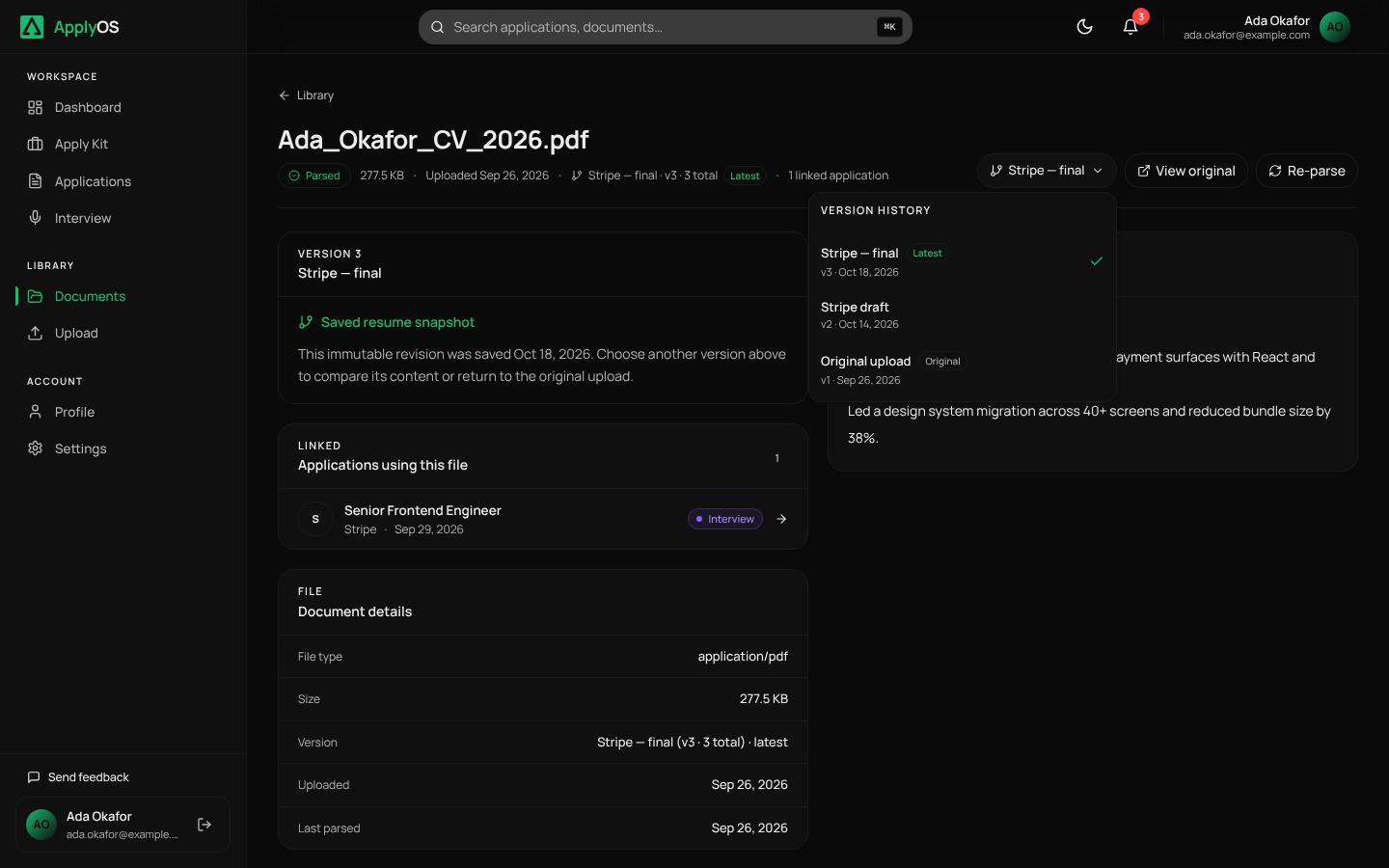
Carry the chosen version through the request
The Job Fit interface sends all three identifiers. This is the request shape used in the component:
body: JSON.stringify({
    applicationId: application.id,
    documentId: selectedDocumentId,
    resumeVersionId: selectedVersionId,
})
The server checks authentication, reads the application and document, and checks that they belong to the current user. It then looks up the requested version within that document and checks its owner too.
The text sent to the model comes from that version's saved editor content. If the version uses the older block format, the route converts those blocks instead. Only the original version can fall back to the source document's parsed or extracted text.
That last boundary matters. Falling back to the upload for an empty edited version would evaluate different content from the content the person selected. The route returns an error for an unreadable edited version instead.
Older callers that omit the version ID deliberately use the original upload. That compatibility choice is explicit in the route.
Use the same identity when saving the result
The analysis table has a unique constraint on (application_id, resume_version_id). The route uses that pair when it writes the pending state, stores a successful result or records a failed model call.
Here is a shortened excerpt of the successful write:
.upsert(
    {
        ...analysisIdentity,
        analysis_result: analysis,
        analysis_status: 'success',
        summary_generated_at: completedAt,
        updated_at: completedAt,
    },
    { onConflict: 'application_id,resume_version_id' },
)
The identity object also includes the document ID. Database access policies check that the application and resume version belong to the signed-in user and that the version belongs to the named document.
This design stores one current result for each application and saved-version pair. Running it again updates that result. It isn't a history of every model response.
The API also distinguishes a model result from a saved result: if analysis finishes but persistence fails, it returns a save error. A successful model call alone doesn't mean the work is safely stored.
Make the connection visible
The interface lets the person choose the document and saved version. Within an application's Job Fit view, successful results are cached by version ID. Selecting a version chooses its matching result; a newly saved version doesn't automatically inherit the previous version's cached feedback.
The important interaction is simple: choose the resume you mean, inspect its feedback, edit it, then run Job Fit on the new saved version when you're ready.
What the checks prove, and what they don't
The repository has unit checks for converting saved editor content into readable text, including block boundaries, invalid input and the older block format. Those checks help verify the text-building step. They don't prove the accuracy of the model's advice or every browser and database interaction.
For changes to this workflow, the regression cases I want to exercise include switching between two saved versions, rejecting a version from another document, rejecting another user's resources, and preserving the correct identity when a model call or save fails.
There are further boundaries to make explicit. The analysis key doesn't include a snapshot of the job description. If that description changes, the application ID still refers to the same application. A job-description revision and a record of the model and prompt used would give the result a more complete account of its inputs. I also want to test what happens when the selected version changes while a request is still running.
These are separate questions from resume versioning. Naming them keeps the engineering claim honest.
The lesson I take into other AI features
Before improving a prompt, I ask whether the application can explain the input behind its answer.
Which record was read? Which saved version? Who owns it? Was the result stored successfully? What should happen if the input changes?
Those questions apply to document summaries, recommendations and other AI-assisted workflows. Clear data relationships give the person a better chance of understanding what the software actually evaluated.
Read the implementation
These links point to the source revision used for this article:
- Job Fit API route
- Resume-version migration and database rules
- Job Fit interface
- Plain-text conversion tests
I'm Najib Oladosu, a Nigeria-based backend-first, full-stack software engineer working with Python, TypeScript, APIs and AI integrations. I'm available for remote engineering roles and scoped product work.
Ready to apply smarter?
Stop wasting time on repetitive applications. Let AI do the heavy lifting.
Try ApplyOS Free